
Sponsored Online Programs Available
Online Degree Programs in Graphic Design
If being creative and loving computers are your thing, then a Graphic Design Online Degree might be perfect for you.In the early days of design and animation, artists, advertising professionals and other creators relied on putting pen, pencil and paint to paper. Those in animation recreated images thousands of times to produce the illusion of motion. Now, modern devices have streamlined this process, allowing creative professionals to generate more material over less time, but with these innovations come harder deadlines and the need for more education in technology.
Getting an online graphic design degree can prepare you for a career in this field as well as give you a competitive advantage. Since we know you have lots of questions about going back to school online, we have written this quick, easy-to-read Mini-Guide to help give you all the facts that you need to make the right choice for you, below.
How can I tell if a Graphic Design Online Degree is right for me?
Whether its an associates, bachelors or masters, graphic design and animation can be very detail-oriented work, so a keen and critical eye is very important. Professionals may work for hours touching up the same photo for a magazine or even the same frame of footage in a motion picture. Patience and endurance is a key element in design because, although the work can be very stimulating and creative, details are critically important and clients and co-workers often push for perfection.
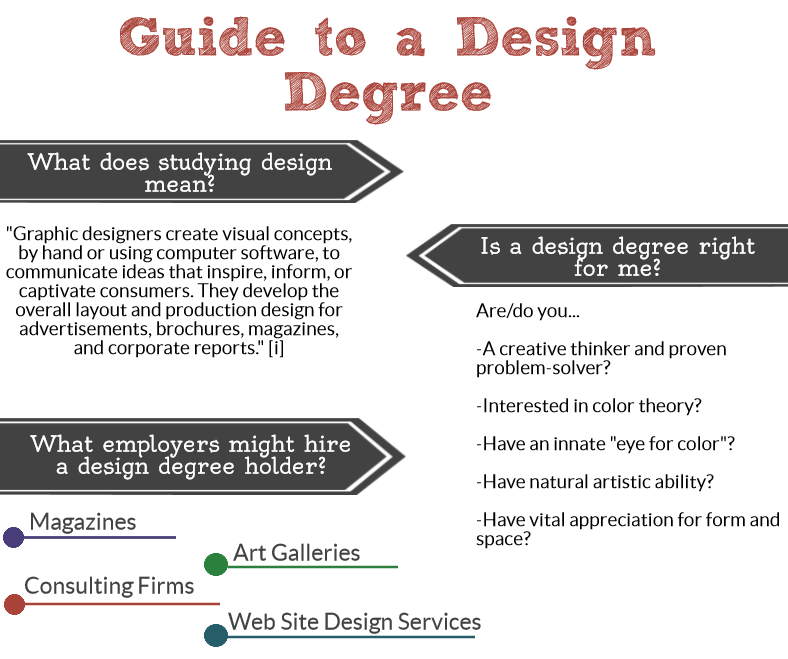
An online graphic design degree may be right for you if:
- You are a creative thinker and proven problem-solver.
- You are interested in color theory or have an innate "eye for color."
- You have a vital appreciation for form and space.
- You have natural artistic ability.
What concentrations exist if pursuing a graphic design degree online?
Many graphic design online degree schools allow you to choose a concentration or specialization, a focused area of study, while pursuing a graphic design degree online. See some of your options:
Graphics and Animation
Blend modern technology and artistic creativity using industry-relevant tools; learn the techniques and skills necessary to utilize digital media equipment and software.
Visual Communication
Learn to meet the needs of a business or organization by applying design principles, technical and marketing skills; develop abilities of problem solving and research to be effective in a business environment.
Graphic Design
Blend modern technology and artistic creativity using industry-relevant tools; learn the techniques and skills necessary to utilize digital media equipment and software.
Illustration Design
Gain professional experience in order to develop a career as an illustrator; learn the fundamentals of business and build out a substantial portfolio.
What courses will I take in a Graphic Design Online Degree program?
While the exact curriculum will vary from school to school at a graphic design online degree, here are some of the courses you might choose to take as a graphic design student:
- 3-D Graphics and Animation
- Advertising Design
- Color Theory and Design
- Fundamentals of Interior Design
- Illustration & Drawing
- Principles of Web Design
- Technology and Visual Communication
- Typography
- Vector Graphics
What skills will I learn as a graphic design major?
When you have completed your graphic design degree, you will likely have gained many of the following skills and competencies:
- Ability to combine aesthetic vision with practical skills and knowledge
- Ability to continually develop a strong professional portfolio demonstrating creativity, imagination and professional competence
- Competence in working collaboratively within a team and as an individual artist
- Demonstrated excellence in analysis, research, and problem-solving skills
- Excellent verbal, written and visual communication skills
- Experience in negotiating and mediating with clients and colleagues when necessary to resolve problems
- Proficiency in creating a creative solution to a visual or communication problem or issue
- Strong time management and project management skills
- Superior understanding of design concepts and principles
- Understanding of how different audiences react and respond to various visual media
A glimpse into the realm of graphic design, animation & multimedia
This creative field takes professionals to various realms in the professional world. Many work with advertising and marketing agencies to draft infographics, logos and brand labels for clients. Others may work for animation companies working on short-form cartoons or commercials. Some may even take up a very specialized role in filmmaking that involves editing and compositing the smallest details in some of the most popular blockbuster films. According to the U.S. Bureau of Labor Statistics, however, most multimedia professionals and animators were self-employed in 2012.[i] Following them, roughly one-quarter of graphic design professionals were self-employed in the same time period.[ii]
For many, this means the work field is largely what you make it. Many work in offices. Others work from their home computers. The commonality between all professionals, however, is a proficiency with technology and an ability to think creatively. If you'd like to begin learning about these cutting-edge tools and design concepts, an online degree in graphic design, animation and multimedia may be the perfect starting point.
Possible salaries for a career in graphic design, animation & multimedia
Your salary as a graphic design, animation and multimedia professional is largely decided by your specific job title, your related experience and your skill level. Consider the following careers, with statistics compiled by the BLS in 2012.BLS in 2012.
- Multimedia artists and animators: 2012 Median annual salary of $61,370 (6 percent projected growth through 2022)[i]
- Graphic designers: 2012 Median annual salary of $44,150 (7 percent projected growth through 2022)[ii]
- Art directors: 2012 Median annual salary of $80,880 (3 percent projected growth through 2022)[iii]
[i] bls.gov/ooh/arts-and-design/multimedia-artists-and-animators.htm | [ii] bls.gov/ooh/arts-and-design/graphic-designers.htm | [iii] bls.gov/ooh/arts-and-design/art-directors.htm